
Three needles, found in hours: a real-world field test of AI agents
A USSP Labs field test. USSP Labs tests AI agents on real problems, the kind that drag on because nobody has the hours to read everything. At an education institution in Chicago, three problems had been open for weeks to months. Agents read every log line, daily report, config and email, and found the one fact behind each. People made every call.
Key takeaways
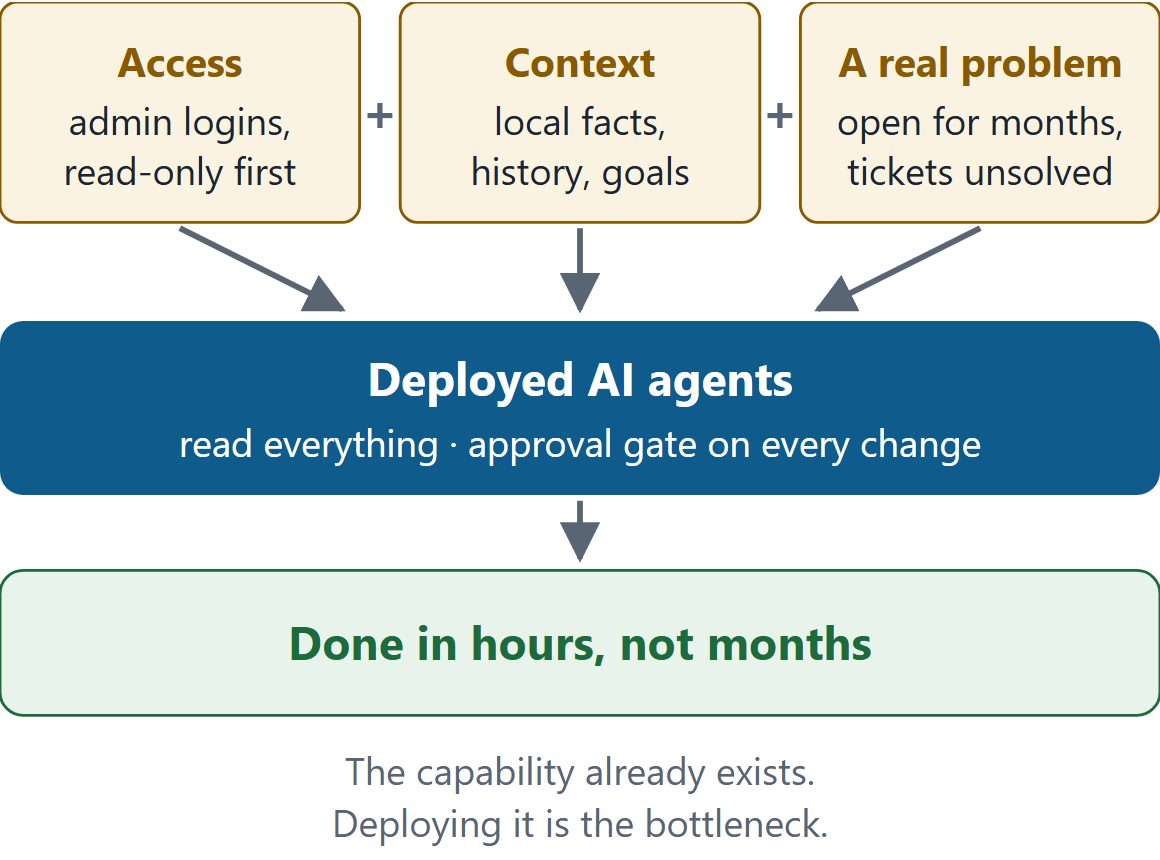
- The capability already exists; deployment is the bottleneck. With the right access, the right context and a real problem, agents closed in about 20 hours what had stayed open for months.
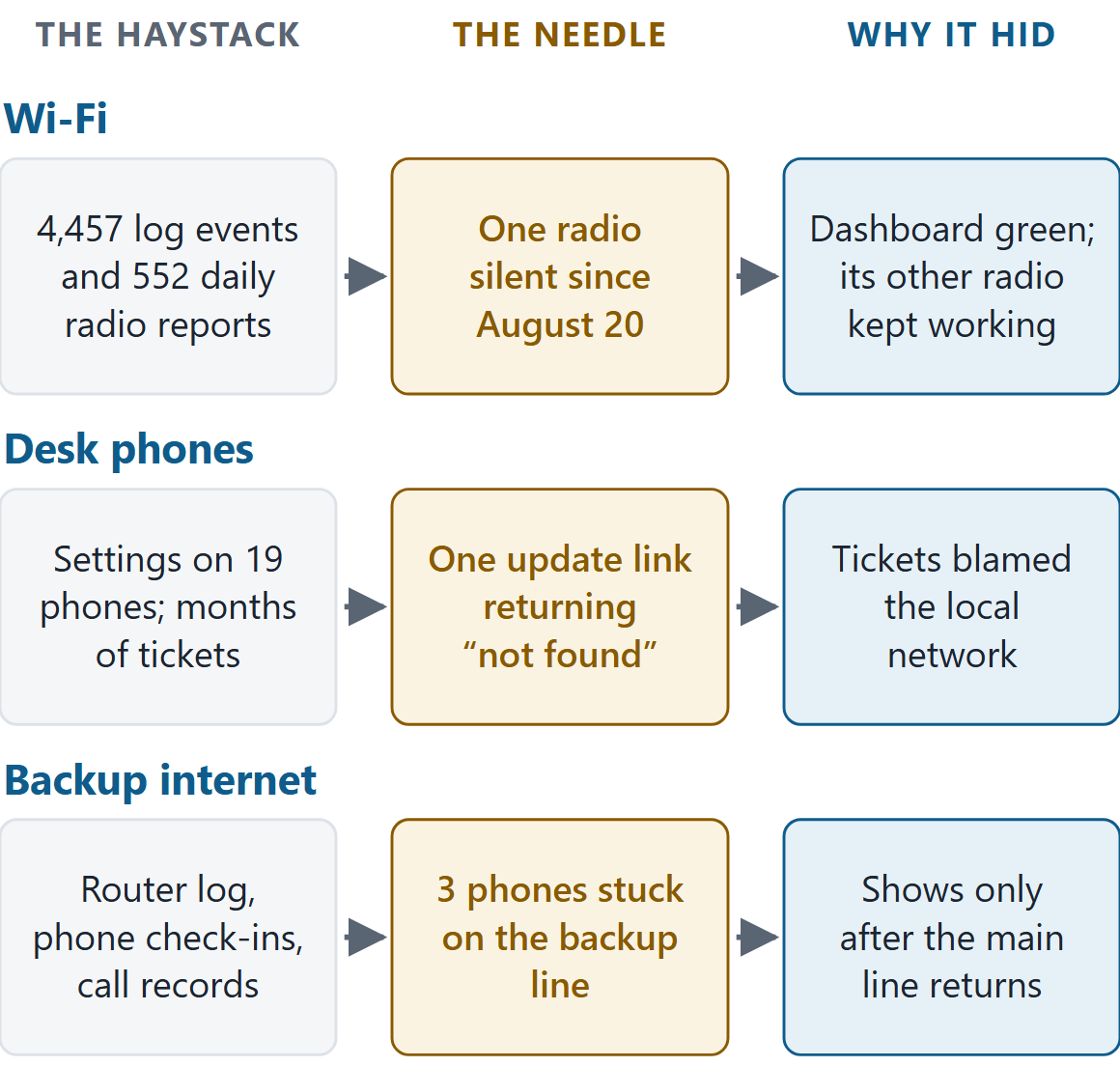
- Each answer was one fact in a haystack. One Wi-Fi radio silent since August 20. One firmware update link that returned "not found". Three phones that stay on the backup internet line after the main line returns.
- Each fact hid where people had no reason to look: behind a green dashboard, under tickets that blamed the network, and in the minutes after a test when everyone stops watching.
- Agents did the mundane work. We estimate it at 30 to 50 human hours. People spent about 4.5 hours on judgment and approvals.
- People kept the decisions. All 10 live changes were approved first and logged with a way to undo them.
The test site and its moving parts
The school is an education institution in Chicago with no IT staff, and it agreed to serve as a real-world test site. We aren't the school's IT provider. Its network and phones were just the haystack we searched. Three problems had survived months of tickets because no one had time to read through all the records: a slow first floor, classroom phones that failed on and off since February, and an internet line that had dropped 56 times in 90 days with nothing to fall back on.
- 6 systems: network controller, phone system, provisioning portal, phones, mailbox, building drawings
- 27 devices: 19 desk phones, 6 ceiling access points, 2 switches, on 2 internet lines
- 4,457 network log events read, 2,274 of them devices hopping between access points
- 552 daily radio reports: three months for each of six access points
- 29 helper agents, reading in parallel
- 4.5 hours of people's time, against an estimated 30 to 50 hours of mundane work
How the agents work
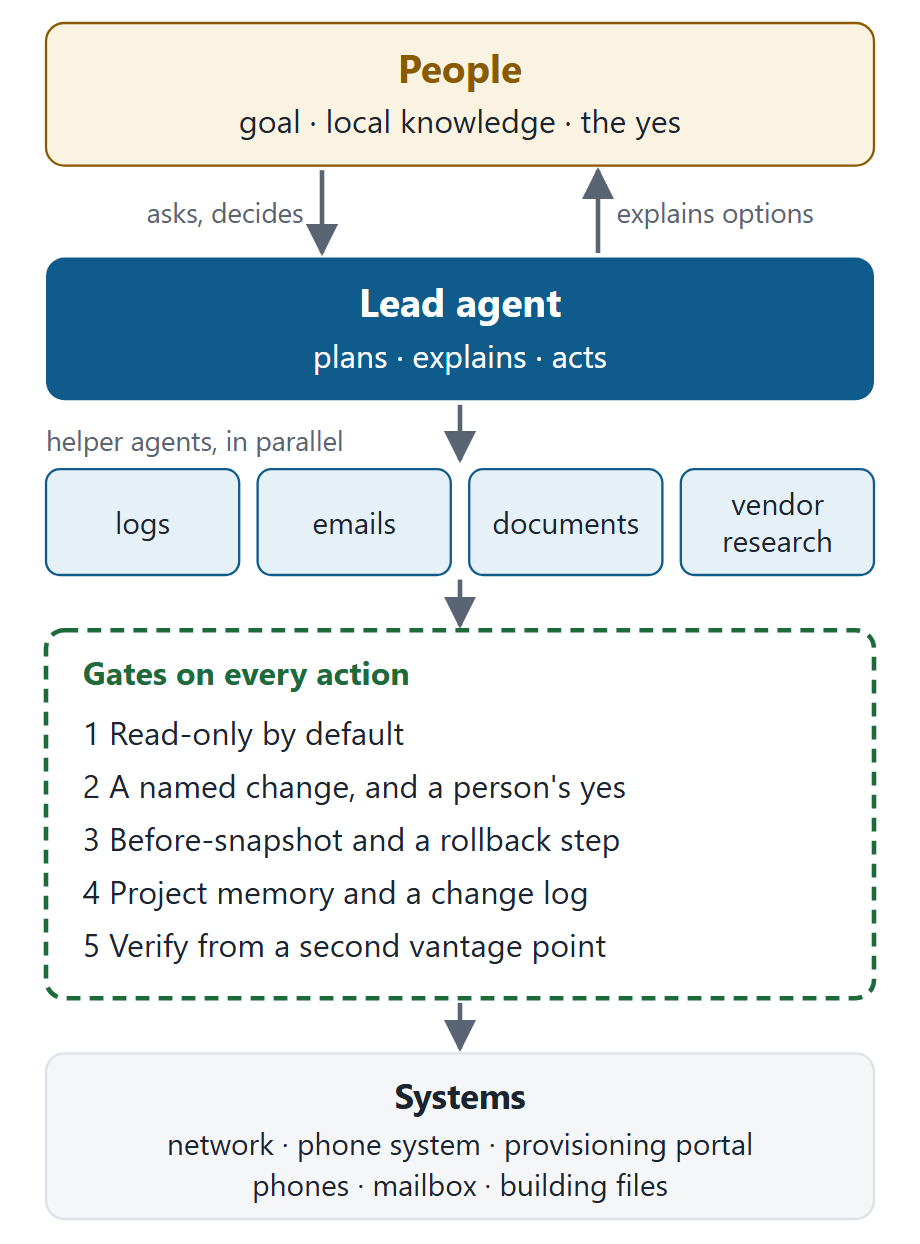
One lead AI agent, built on Claude Code (Anthropic), makes the plan, explains it in plain words and carries it out. The slow, exhaustive reading goes to helper agents running side by side. The school's director talked to the lead agent directly, and every action on a live system passed the same gates.
Case 1: A radio silent for two months behind a green dashboard
- The haystack: 4,457 network log events and 552 daily radio reports: three months of history for six access points.
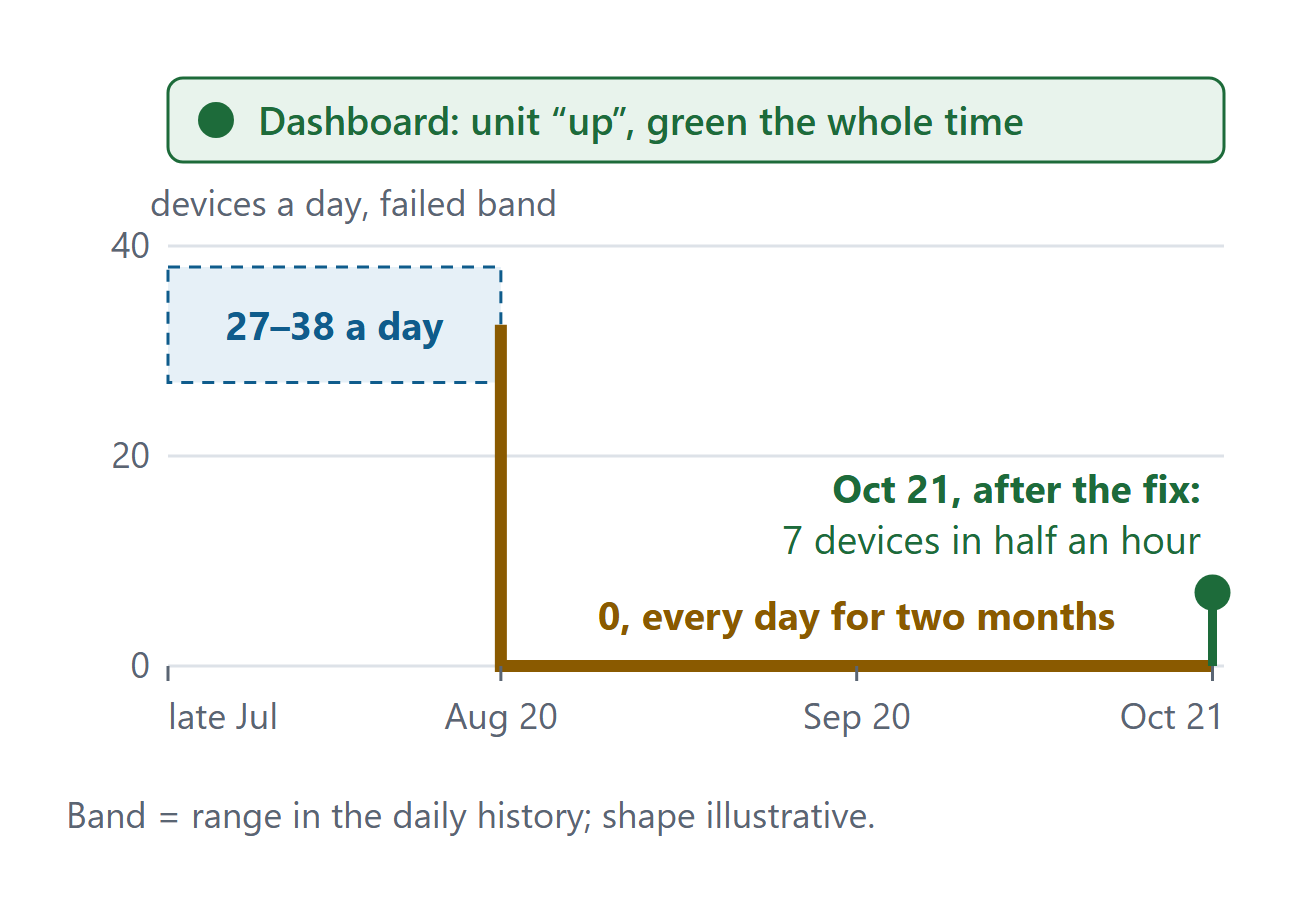
- The needle: one 5 GHz radio that carried zero devices every day from August 20.
- Why it hid: the unit's second radio kept working, so the dashboard showed it up and green. Nobody reads 552 daily rows to second-guess a green light.
- What it took: about 20 minutes from the first message to the find. The agent then worked out which floor the unit was on from how devices moved, with nobody on site.
The complaint was a slow first floor near the office. One access point there was overloaded and its neighbor nearly idle. The agent's first guess, that devices were avoiding the idle unit's channel, was wrong. The school's team pushed back in one line: "It just started happening."
If the problem was new, something had changed. The agent pulled three months of daily history and dropped its guess. The idle unit has two radios, one per band. Its 5 GHz radio went silent on August 20. The 2.4 GHz radio kept working, so the unit still reported itself as up and the dashboard stayed green. The staff network only uses 5 GHz, so every staff laptop on the floor had crowded onto the neighbor.
Which of six identical ceiling units was it? Nobody was on site to blink a light, so the agent worked it out from how people move. Walk down a hallway and your phone hops from one access point to the next, and people walk along a floor far more than they take the stairs. Units that trade the most devices are therefore neighbors on the same floor. The 2,274 hops fell into three clean pairs, and the switch wiring put the problem pair on floor 1. The school's team added the fact no log held: "Floor 3 has no classrooms, only gyms." The two quietest units fit.
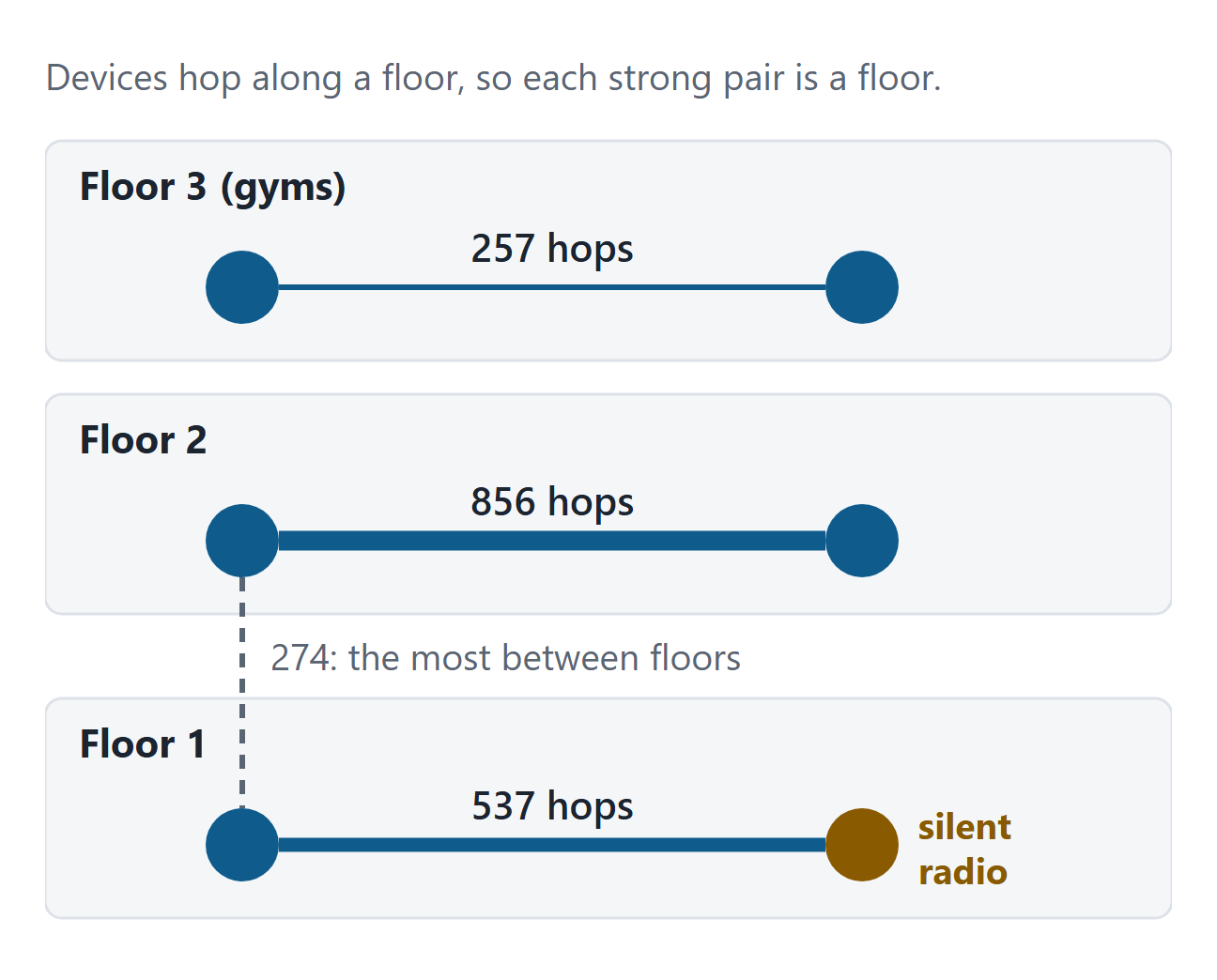
Outcome: with the school's approval, the radio moved to a quieter channel after hours. It had seven devices on it within half an hour, at midnight in an empty building.
Case 2: One broken link behind months of phone tickets
- The haystack: settings and firmware on 19 phones, the provider's setup template, three months of switch-port history, and months of tickets and emails.
- The needle: one firmware update link that returned "not found".
- Why it hid: the tickets blamed the local network, and the phones worked most of the time. Nobody had a reason to click the link the phones were given.
- What it took: one overnight session to rule out the network, compare every phone and follow the update link to its dead end.
Classroom phones had failed on and off since February, then recovered on their own. The provider's ticket responses had put it down to the local network. The agents checked that first and found zero errors and zero dropped links on the phones' switch ports in three months. A network fault takes every phone down at once; these failed one at a time.
When the agents compared all 19 phones, the failing ones shared old firmware. Each phone holds an open connection to the hosted phone system. Newer firmware notices when that connection dies without warning and reconnects. The old firmware assumes it is still connected until its next scheduled check-in. That matches the complaint exactly: the phone fails for a while, then fixes itself. That is our reading of the evidence. The provider hasn't confirmed it.
Why had they never updated? The agent opened the provisioning portal and followed the update link the phones were given. It pointed to a file that didn't exist. The correct file sat on the same server.
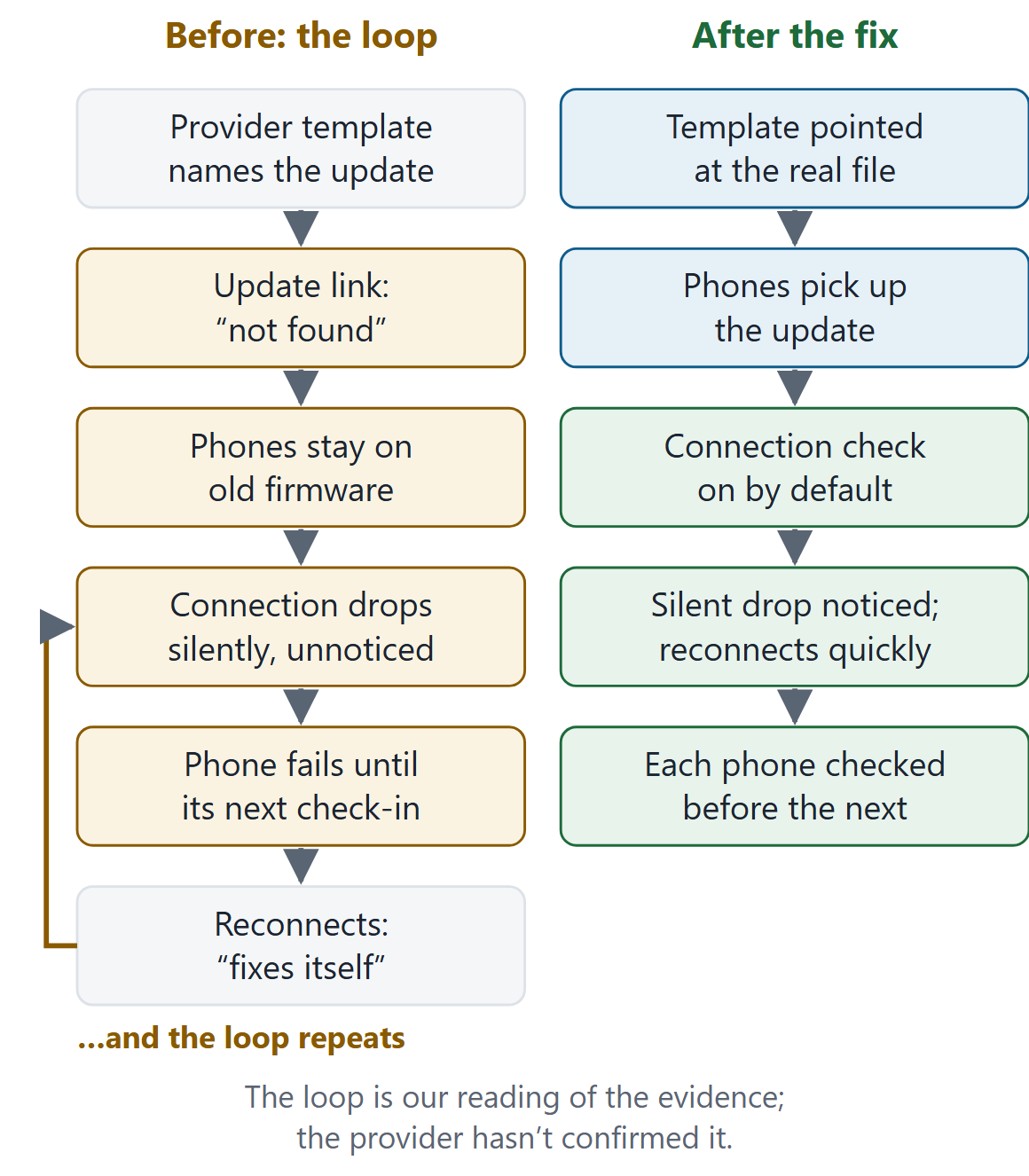
Outcome: with the school's approval, the template now points at the real file. The failing phones updated one at a time and now run the same firmware as the phones that never failed. A follow-up review is due at the end of October.
Case 3: Three phones that only misbehave after the outage ends
- The haystack: the router's event log, the address each of 19 phones checked in from, and the call records, across two pull-the-cable tests.
- The needle: three phones, two of them at the front desk, still pointed at the backup line after the main line came back.
- Why it hid: it only shows after the main line returns, when a test looks finished. And pulling the cable cut off the agent's own view of the school.
- What it took: one evening with staff on site, and the proof read afterwards from records that don't depend on the agent's connection.
The school had a new 5G backup line and one evening to test it. Before the first pull, the school's team raised a point the plan had missed: "You're on the school VPN. When I pull the main line, you'll lose it too."
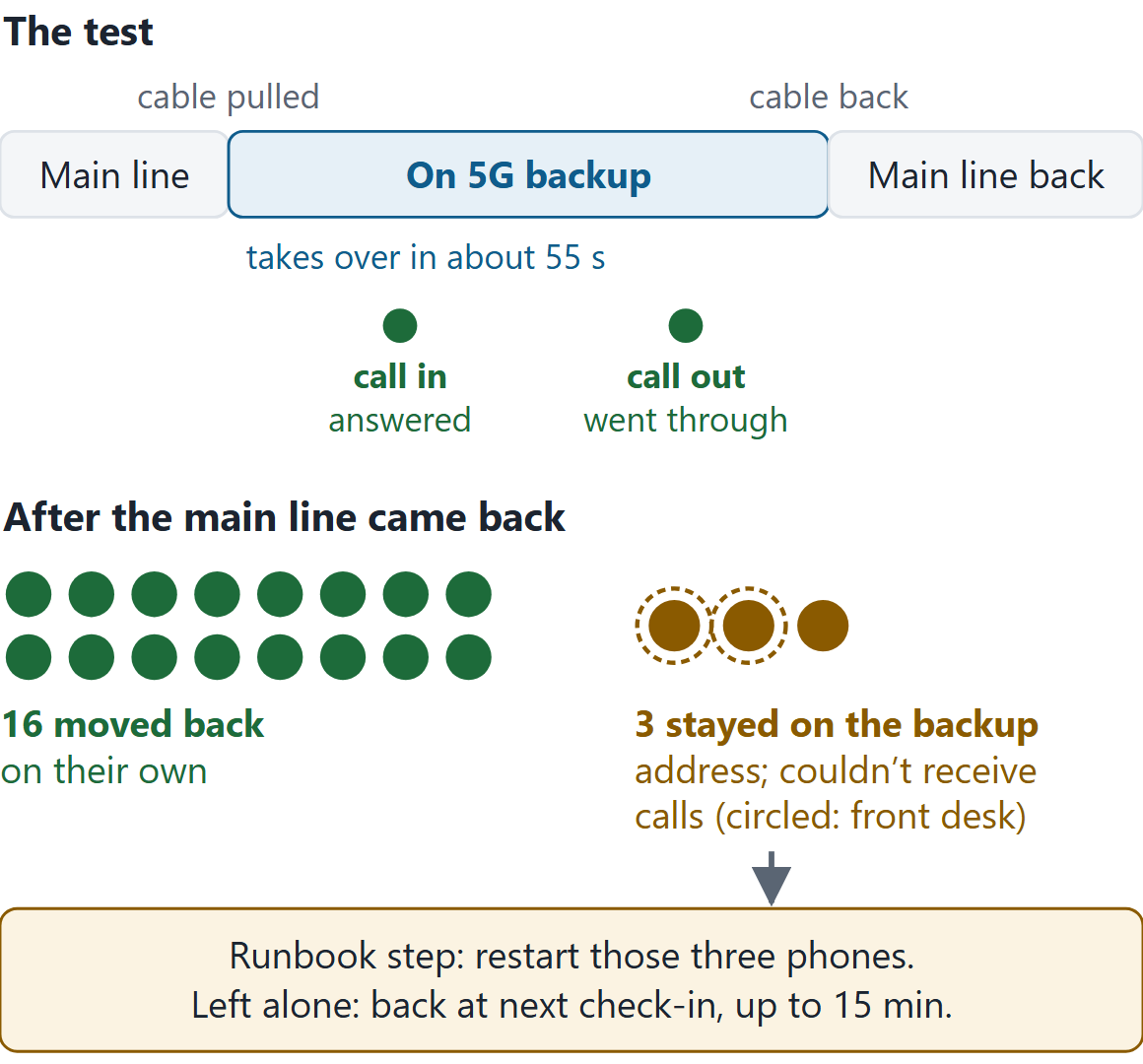
They were right. The agent reached the school over the main line, so the test would cut it off just when it most needed to watch. The proof had to come afterwards, from records that don't depend on the agent: the router's event log, the phone system's record of which address each phone checked in from (the cellular carrier's, during the test), and the call records. Backup took over in about 55 seconds, and the school's team insisted on a real call in as well as a call out. Both went through.
Then the main line came back. Sixteen phones moved back to it on their own. Three kept pointing at the backup address and couldn't receive calls until they were restarted. The school judged the worst case, up to 15 minutes, acceptable, since other phones in the ring group still ring. The recovery step is now in the outage runbook.
What people did, what agents did
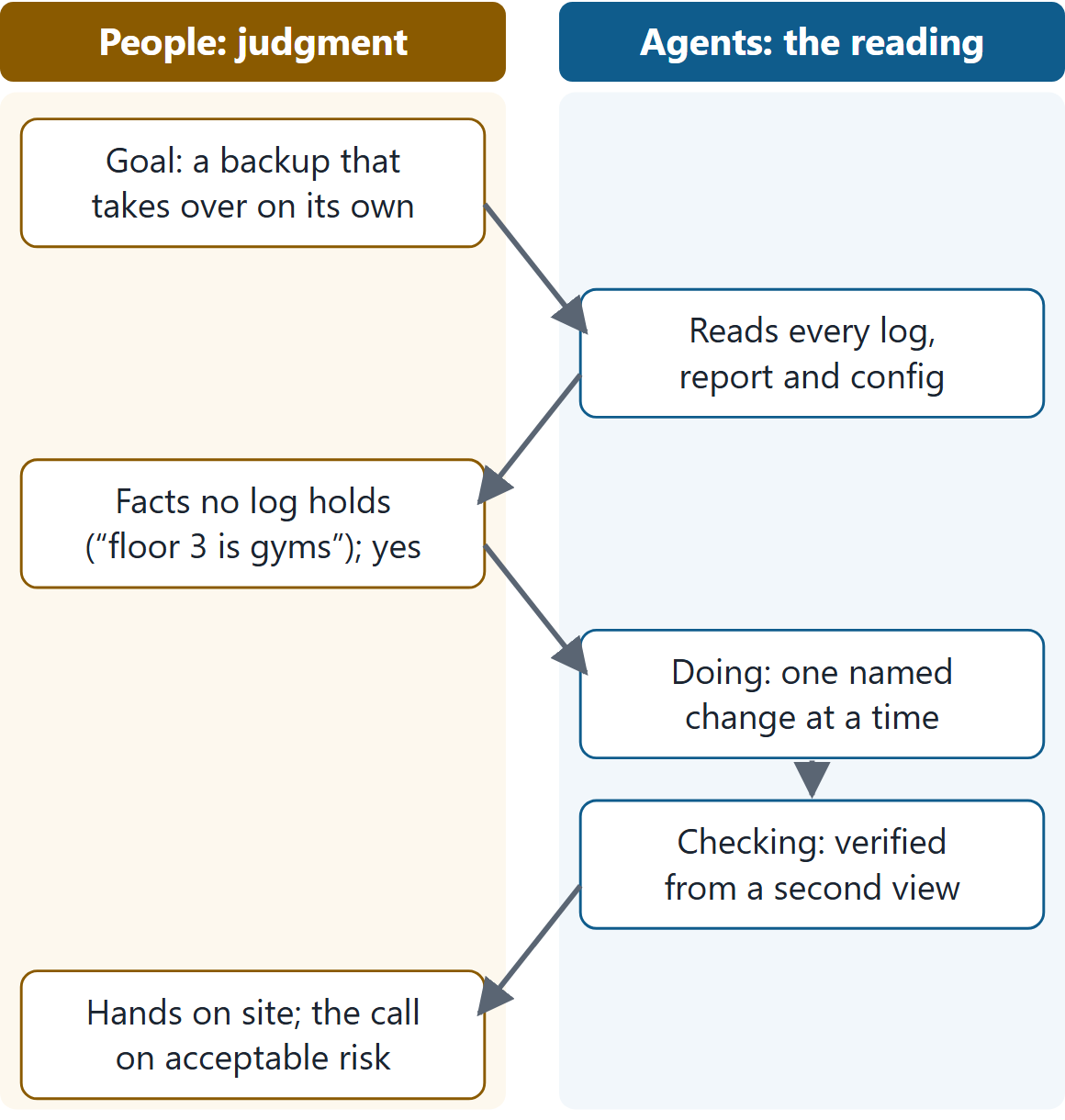
The agents did the reading nobody had hours for. People supplied what no log holds, such as "it just started happening" and "floor 3 is gyms", and made every call that carried risk.
Guardrails
- Read-only unless a person approves a named change. All 7 emails sent on the school's behalf were shown word for word and approved first.
- Every change can be undone. A before-snapshot, a rollback step and a change-log entry.
- Secrets stay secret. Passwords live in one protected file, referred to by name, never in documents or emails.
Other haystacks
The network was the test case. The same work applies anywhere a system keeps records that nobody has the hours to read in full.
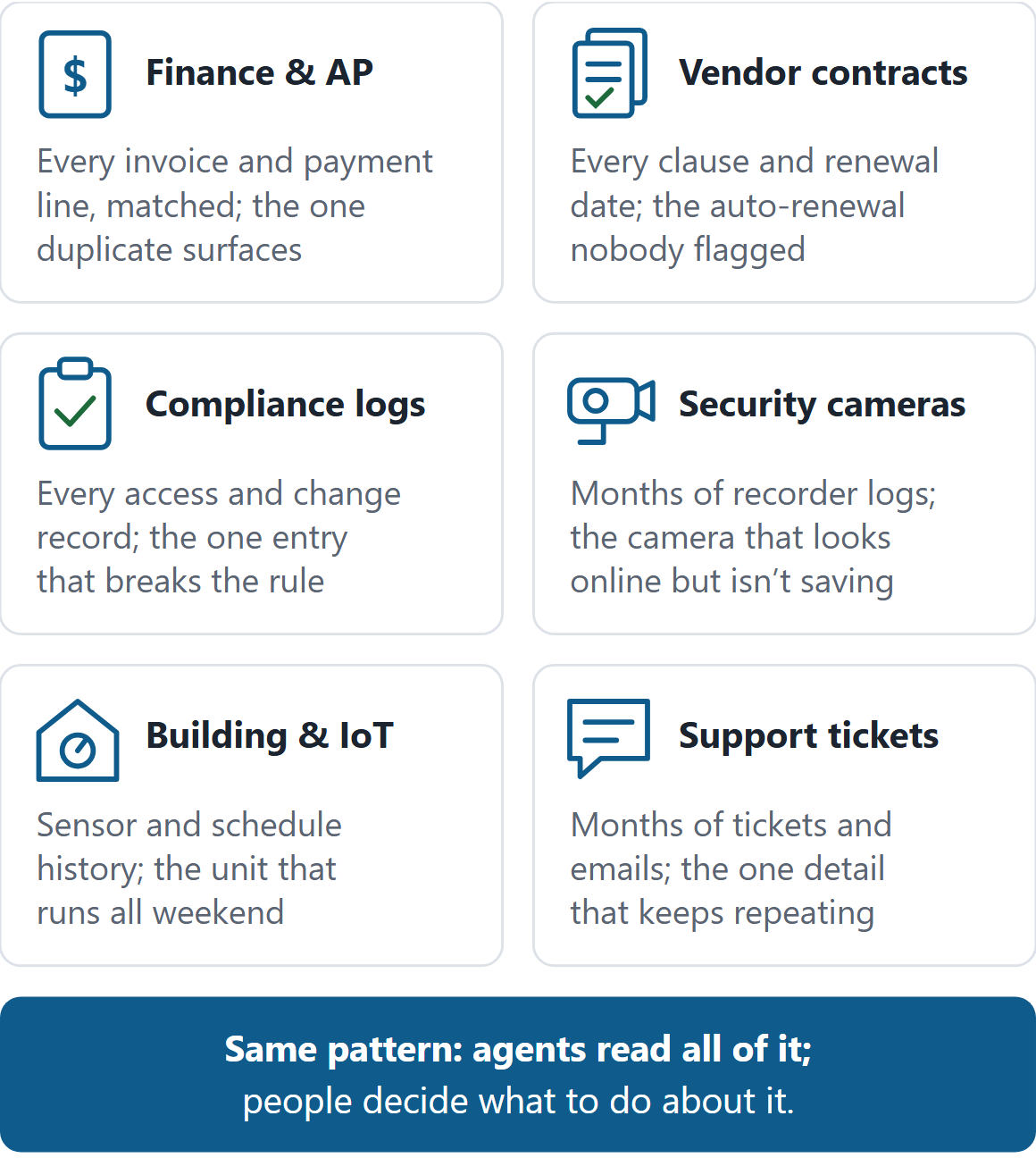
From one building to many
This was one building, over one night and one evening. That was small enough to watch every step, and the problems were real ones. Nothing that made it work depends on this particular building. Access to the systems, context from the people who run them, a real problem, and an approval gate on every change can be set up again at the next site and the one after that, whether that's a group of schools, a franchise or a property portfolio, each with its own people making the calls. That's where we're taking this, though we haven't run it at that scale yet.
What we learned
- The needle is usually one fact. The hard part is reading enough to reach it, and that reading is the part people can't staff.
- Local knowledge still decides. "It just started happening" overturned the agent's first theory in one line. No log said floor 3 was gyms.
- Plan for the agent's own view going dark. The agent lost its view at exactly the moment that mattered most. Proof has to come from records that don't depend on it.
- Agents need checks on agents. Early on, the school approved a cleanup directly to a helper agent. The lead agent hadn't seen that approval, so it paused the helper and checked that no working phone was affected before carrying on. Since then every approval goes through one channel.
The hours (estimated): agents did the mundane reading and checking, which we estimate would take 30 to 50 human hours. People spent about 4.5 hours on judgment and approvals, over about 20 hours elapsed.
Frequently asked questions
What does it take to deploy AI agents on a real operational problem?
Four things: access to the systems, context from the people who run them, a defined problem, and an approval gate on every change. The agents themselves already exist. At a school in Chicago, that setup cleared three problems that had been open for weeks to months, in about 20 hours of elapsed time.
How do AI agents find a needle in a haystack in operational data?
By reading all of it, then asking what changed. At a school in Chicago, agents read 4,457 network log events and 552 daily radio reports and found one Wi-Fi radio that had carried zero devices since August 20, while the dashboard showed green.
What kind of work should be handed to AI agents?
The exhaustive reading people skip or can't staff: every log line, daily report, config, ticket and email. Keep judgment, local knowledge and approvals with people. In this field test the agents did the reading, and the school's team supplied the facts no log held and approved each change.
How much human time do agents save on exhaustive log review?
In this field test, agents did mundane work we estimate at 30 to 50 human hours. People spent about 4.5 hours on judgment and approvals, over about 20 hours elapsed. The estimate is ours, and results depend on how much history the systems keep.
Why do problems hide from dashboards and ticket queues?
Because they sit where nobody has a reason to look. In this case that meant an access point that stayed green because only one of its two radios had failed, a broken update link behind tickets that blamed the network, and three phones that only misbehaved after the main internet line came back.
Do AI agents make changes without approval?
No, not in our model. Agents are read-only by default, and each live change is named, approved by a person, snapshotted first and logged with a rollback step. All 10 live changes and all 7 emails in this field test were approved first.
Have a haystack? We deploy agents to read all of it: the logs, reports, contracts or tickets your team never has the hours for. You keep the decisions. Talk to USSP Labs
The school is an education institution in Chicago that served as a willing test site. Its phone provider is not named. Outcomes still pending: a daytime Wi-Fi re-measure and an end-of-October phone review.