
Your Wi-Fi already logs how people move. AI agents can read it.
USSP Labs · Field note and thesis
Every time a phone walks from one access point's range into the next, the Wi-Fi controller writes it down. Those hops are a running record of motion that almost nobody reads. AI agents can turn them into the busiest paths, the busy hours, the places people spend their time, and alerts when an area surges or goes quiet. We tested the signal at an education institution in Chicago: one week of hops cleanly separated the building's floors and followed the school day hour by hour.
What this is: an early field result and a thesis, not a finished product. We validated one thing with real data: the hops carry a clean movement signal. Paths, dwell time and triggers are what we think that signal makes possible. We label which is which as we go.
Key takeaways
- Hops are a record of motion, already being logged. Every business Wi-Fi controller notes when a device moves from one access point to another, and when. There is nothing new to install.
- Agents turn hops into movement patterns. High-traffic paths, busy hours by area, dwell spots where people spend their time, and flow between zones.
- The same patterns can fire triggers. A surge at an entrance, a hallway jam at pick-up, an area that goes unusually quiet or unusually busy, movement after hours.
- We checked the signal on a real building. At the school, 1,650 of 2,274 hops stayed on one floor, and the hourly count traced the school day. We haven't tested paths, dwell or triggers yet.
- Aggregate and anonymous only. Count spaces and flows, never individuals. This matters most where children are.
A hop is a footstep the network already records
Business Wi-Fi uses several access points, the white discs on the ceiling. Your phone stays connected to one until the signal from another is better, then it switches. That switch is a roaming event. The controller logs it with a time, the device and the two units involved.
One hop says almost nothing. Thousands say a lot. If two units trade devices all day, people are walking between them, and that is a path. If a unit trades with nobody, it is a corner, a closed room or a dead spot. Group the units that trade most and you get zones. Add the clock and you see when each zone fills, how long it stays full and when it empties.
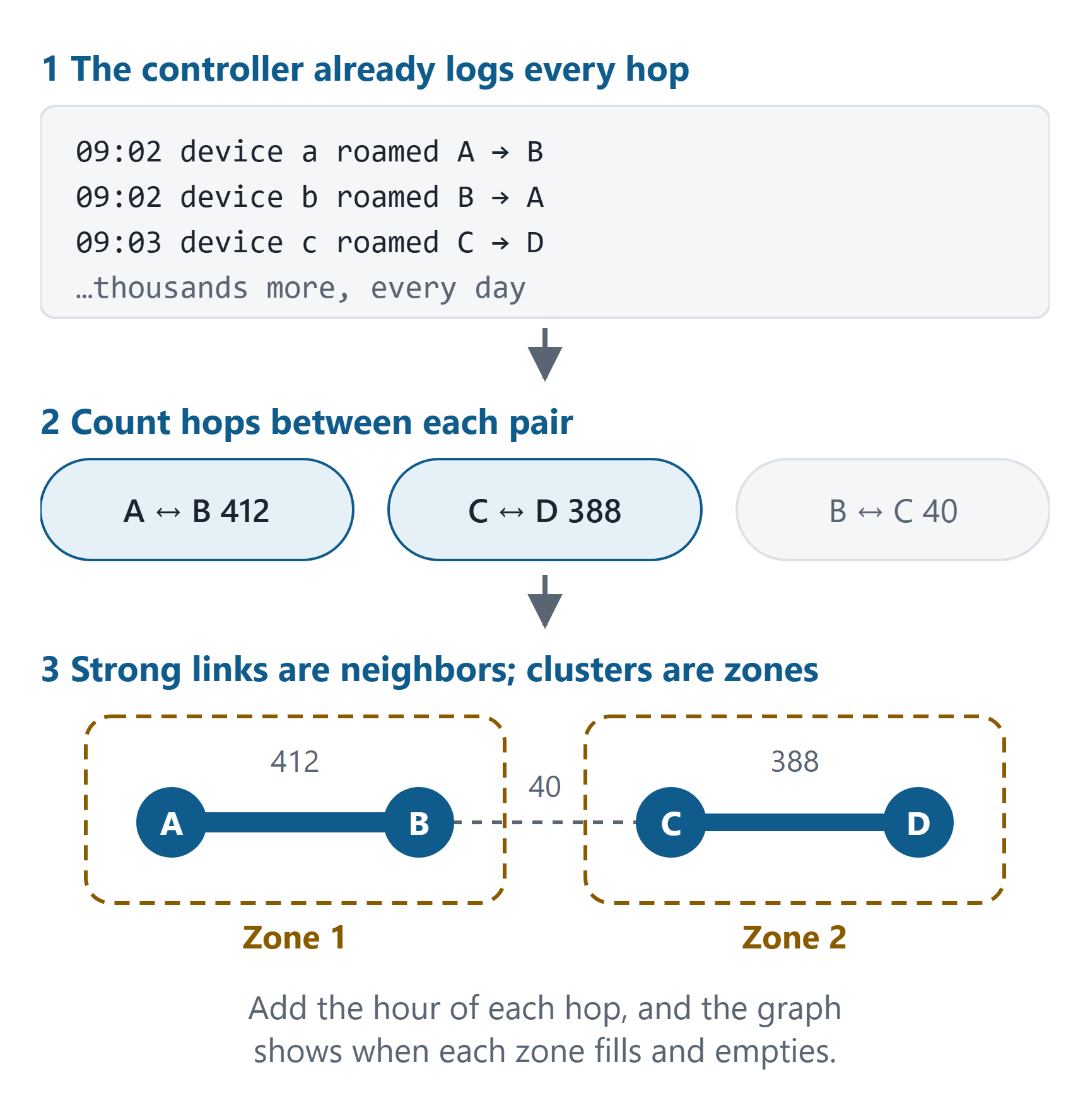
Every hop is a timestamped step from one area to the next. Thousands of them are a record of how a building is used.
What movement looks like in the data
Once hops are grouped into zones, four kinds of pattern come out of the same log. None of them requires knowing who anyone is. They are counts of devices per zone and per hour, and the moves between zones.
| Pattern | What it tells you | How agents get it from the hops |
|---|---|---|
| High-traffic paths | The routes people actually take, and the ones they skip. | Count hops between each pair of zones. The heaviest links are the main routes; the order of hops (entrance, then where?) gives the common sequences. |
| Hotspots | Which areas hold the most people, and when. | Count distinct devices in each zone per hour, then compare weekdays, weekends and events. |
| Dwell spots | Where people spend their time, not just pass through. | Time from a device arriving in a zone to leaving it, averaged over many devices. Long stays and few hops through mark a place people stay. |
| Time of day | The building's daily rhythm: when it fills, peaks and empties. | Hops and devices per hour. This is the one pattern we have already seen at the school (below). |
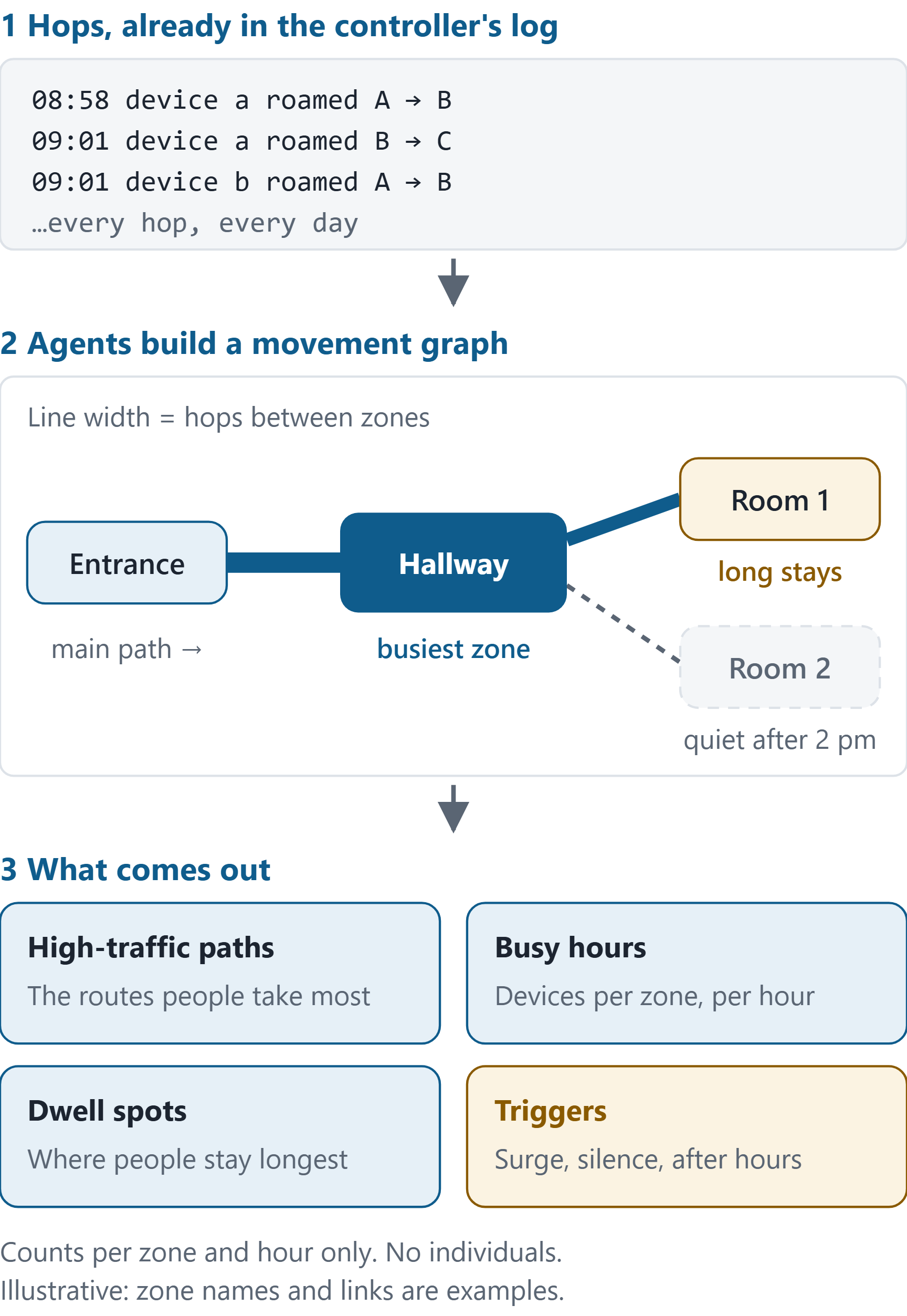
All of this works at the level of zones. Wi-Fi roaming tells you which access point's area a device is in and when it moved, not where someone is standing. For paths, busy hours and dwell, that is usually enough. Owners ask about rooms, wings and entrances, not square feet.
Triggers: when movement changes
Patterns show what normal looks like, and a trigger fires when today looks different. Once agents know a building's usual week, a few simple rules go a long way. These are examples; we haven't run them yet.
- Crowding at a doorway. At a family entertainment center, devices bunching at a party-room entrance ten minutes before a party starts. Send someone before the line forms.
- A pick-up surge. In a school hallway, hops spiking at the end of the day earlier or bigger than usual. Open the second door or add a staff member.
- A zone that goes silent. An area that is normally busy at 10 am and carries nothing is either closed or broken. At the school, one unit's 5 GHz radio was silent for a whole week; that was the fault we were there to fix. A rule like "this radio carried no devices today" would have flagged it the first morning.
- Unusually busy. A wing or room far above its normal count for the hour: an event nobody scheduled, or a space that needs more staff or cleaning.
- After-hours movement. Hops in a building that should be empty, at 2 am or on a holiday. It could be a cleaning crew, a door left open or something worth checking.
Each trigger is a count crossing a line, so none of them needs an identity. The alert says "party-room entrance, three times normal", not who is there.
How we validated the signal at the school
USSP Labs is an AI lab that field-tests agents on real problems. The school is one of our test sites. We were there to fix a slow first floor and needed to know which ceiling unit was which: six identical access points, three floors, nothing marked on the drawings and nobody on site. So the agents read the hops. If hops really record movement, they should split the building the way people walk it, along a floor far more often than up the stairs.
| 2,274 | roaming events: every hop between access points the controller logged, Oct 7 to 14 |
| 6 | access points on 3 floors, with no locations on the drawings |
| 73% | of hops (1,650) stayed on one floor, inside three pairs |
| 58 | devices made the hops; 44 of them used a randomized address |
| 98% | of hops happened on weekdays, nearly all during opening hours |
| 0 | site visits, new hardware or new software |
They did. Of the 15 possible pairs of access points, three stood far above the rest: 856 hops between one pair, 537 between another and 257 between a third. Those three pairs held 1,650 hops, 73% of the total. The strongest link between units in different pairs was 274, and every other link was 95 or less.
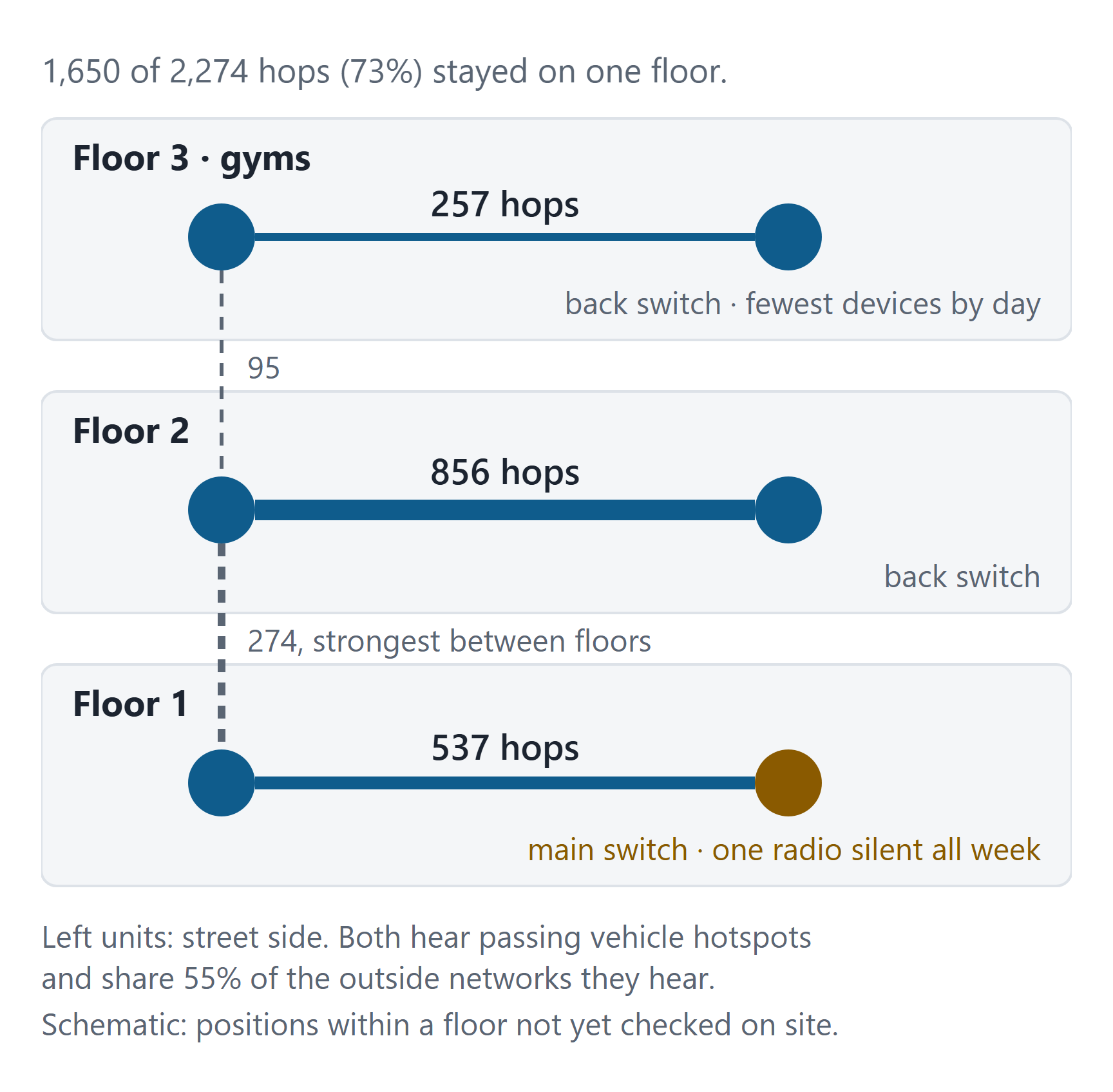
Three checks that have nothing to do with roaming put each pair on its floor. The wiring: floor-1 desk phones use one network switch, floors 2 and 3 the other. The school's team: "Floor 3 has no classrooms, only gyms," and one pair carried the fewest devices by day, about 3 each. The outside networks each unit hears: two units share 55% of them and pick up passing vehicle hotspots, so they face the street. All three agreed. We're confident about each unit's floor. Its position along the floor is still a best guess until someone walks the building.
The school day, by the hour
The same hops carry a time. Plotted by hour on weekdays, they follow the school day closely. The school is open 7 am to 6 pm.
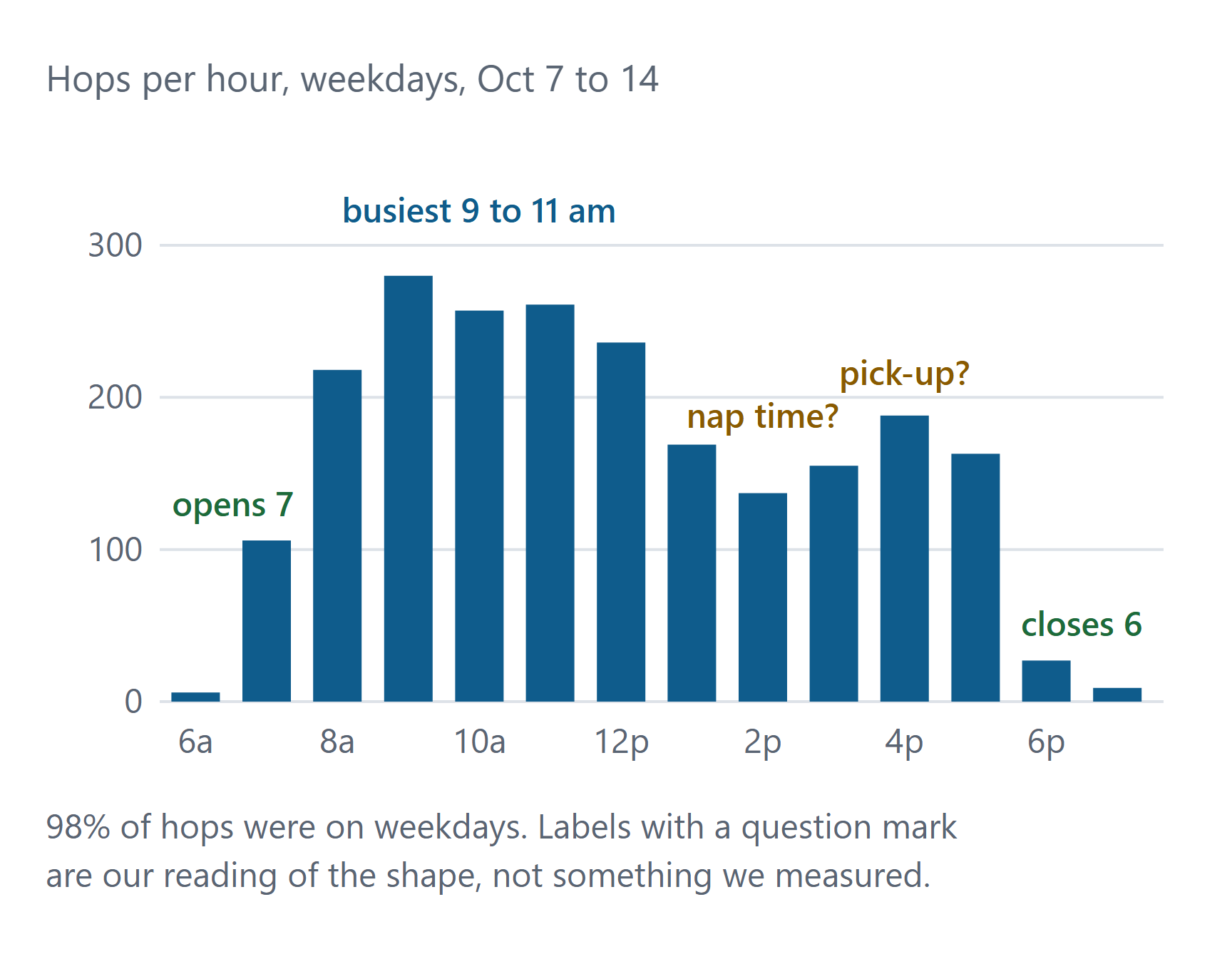
Hops start at 7, peak between 9 and 11, dip in the early afternoon, rise again around 4 and stop after 6. The dip could be nap time and the 4 pm rise could be pick-up. We haven't checked either against the schedule. Either way, this is the time-of-day pattern from the table above, drawn from data nobody was looking at. Split by zone instead of by building, the same counts would show hotspots, and watched day after day they could drive triggers.
Use cases by venue (not yet tested)
Everything in this section is a hypothesis. We think each question can be answered from the controller logs a site already has. We haven't run any of these yet.
Family entertainment centers
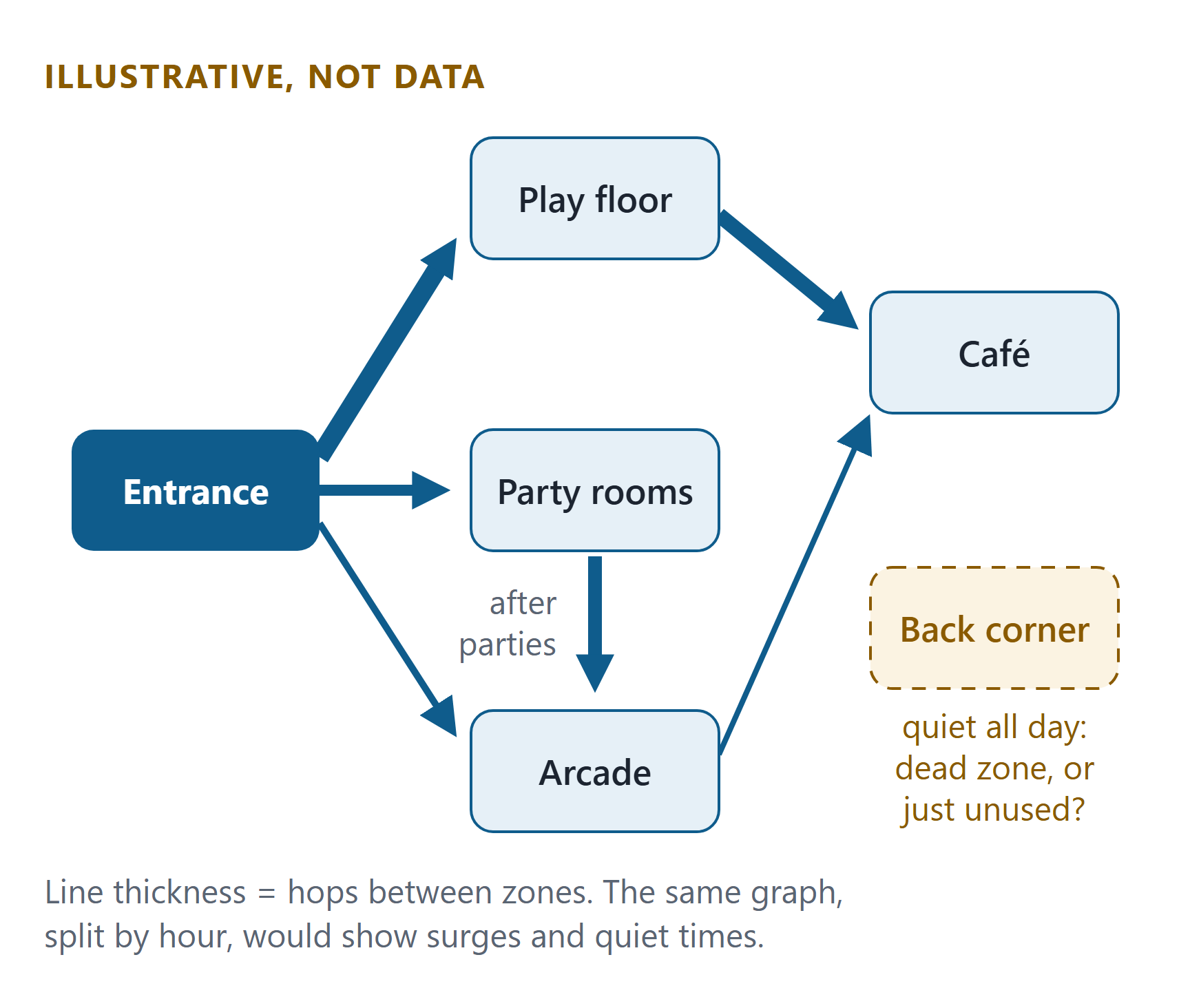
A trampoline park or arcade is a building people move through in a pattern: check-in, play floor, party room, arcade, café, exit. The movement questions are concrete. Where do crowds bunch? How long does a birthday group stay after the party ends, and do they head to the arcade or the exit? Which corner does nobody visit? The trigger that matters most is crowding: at the check-in desk, at a party-room door, at the café when a session ends.
Schools
In a school the questions are about safety and timing: how the building fills at drop-off and empties at pick-up, which hallway jams between periods, whether a wing is used at all after lunch, and whether movement after hours is expected. The moving devices are mostly adults' phones and classroom tablets; small children don't carry phones. In schools where students do, the privacy bar is higher.
Offices, retail and venues
| Venue | Movement question | Possible trigger |
|---|---|---|
| Offices | Which floors and rooms are used, on which days, and how much space is really needed. | A floor empty all week; a meeting area over its normal count. |
| Retail | Which aisles and departments draw traffic, how long people stay at a display, the path from entrance to checkout. | A checkout queue building; a department suddenly quiet. |
| Venues and events | How entry lines form, which concourses carry the crowd, where people gather between sessions. | An entry or exit surge; an area filling past its normal level. |
Why agents, and not a product
Indoor location and foot-traffic products exist, and some are good. They usually mean new sensors, a subscription and a setup project. For a first answer you don't need any of that. An agent with read-only access can export the hops, build the movement graph, find the paths, busy hours and quiet zones, cross-check them against what the building's people know, and write it up in plain words. At the school the hard part wasn't the math. It was combining the hops with wiring, staff knowledge and the networks next door, which is the kind of open-ended reading agents are good at.
We think the capability exists today. What's missing is deployment: someone giving agents the access, the context and a real question.
From agents to a small model that runs on site (next step)
An agent's first pass is exploration: read everything, find the movement patterns, explain them. Once a pattern is worth watching every day, agents can build the watcher as well. They label the log data the site already has, fine-tune a small open model on it, and package it to run on a local machine. The model learns the site's normal week and raises a trigger when today looks different. It needs no cloud subscription or six-figure foot-traffic platform, and the data never leaves the building.
- Start with the data you have. Months of controller logs are already a training set. Agents label it: busy or quiet, normal or unusual, which zone, which path.
- Small and local. A compact model on an office PC or a small edge box scores each hour's hops against the site's normal pattern and flags surges, silences and after-hours movement.
- Agents keep it current. When the layout, the opening hours or the access points change, agents retrain it and re-check the result with the site's people.
- Alerts people can act on. Crowding at a party-room door, a pick-up surge in a hallway, a zone gone silent, cleaning and staffing based on how spaces are actually used.
This is the direction we're building toward. We haven't deployed it at the school yet.
Privacy and ethics
A tool that sees how people move could be misused to watch individuals. We don't do that, and anyone trying this should set the rules before looking at the data. This matters even more where children are.
- Count spaces, not people. The output is devices per zone per hour, flows between zones, dwell averaged over many devices, and alerts on those counts. Don't report any group so small it could point to one person.
- No identities. Drop device names and never join Wi-Fi data with logins, badges, cameras or rosters. If the question needs a named person, it is the wrong question for this data.
- Know what randomized addresses do and don't do. Most modern phones use a random address per network (44 of the 58 devices at the school did). That stops linking a phone across sites, but a phone may keep the same random address on one network for a long time. Treat the data as personal anyway.
- Keep raw events briefly. Keep the aggregates, delete the raw events after a short, fixed period.
- Tell people. A sign or a line in the Wi-Fi policy saying the data is used, in aggregate, to understand how spaces are used, for safety alerts and for fixing coverage.
- Check local privacy law and your own policies before starting. Rules differ by state and country, and schools often have extra ones. Involve parents or a board where children are concerned.
- Owner approval and read-only access. The owner decides the question and signs off. Agents read the logs and change nothing.
- Not for watching staff. Using it to time someone's breaks or follow one person's route would break trust and, in many places, the rules.
How to try it
Three inputs, three outputs.
- Access to the controller's events. Read-only, or an export. Check how far back roaming events go first: ours only kept about a week.
- Site context. Floors, what each area is used for, opening hours, any floor plan, even a rough one. One line like "floor 3 is gyms" can settle what the data can't.
- A question. "Where do people spend the most time?" "When does the party wing fill up?" "Tell me when the back hallway gets crowded."
What the agent hands back: a movement graph (zones and the paths between them, and how strongly they're linked), patterns (busy hours, dwell spots and quiet areas, each with a confidence level), and a short report (suggested triggers, and what still needs checking on site).
What we haven't done
- One building, one week of roaming events. We validated that the hops carry a clean movement signal: they separate the floors and follow the day.
- Paths between zones, dwell time and triggers are untested. So is anything at a family entertainment center, office, store or venue.
- The hourly chart is a first look. We haven't compared it with attendance or the daily schedule.
- Positions within a floor are unverified. We still owe the building a walk.
- There is no on-site model yet.
Frequently asked questions
What is a Wi-Fi roaming event?
It is the log entry a Wi-Fi controller writes when a phone, tablet or laptop moves its connection from one access point to another, usually because its owner walked out of one unit's range and into the next. Most business Wi-Fi systems record it with a time and the two access points.
Can Wi-Fi data show how people move through a building?
Yes, in aggregate. Access points that trade devices often are linked by a path people walk, and the hour of each hop shows when an area is busy. At an education institution in Chicago, 1,650 of 2,274 hops stayed on one floor, and the hourly count traced the school day.
Can Wi-Fi show where people spend the most time?
Yes, at the level of zones, though we haven't measured it yet. Dwell time is the gap between a device arriving in an access point's area and leaving it, averaged over many devices. Zones with long stays are where people spend time; zones with many hops and short stays are corridors.
Can Wi-Fi data trigger alerts when an area gets crowded?
Yes, as long as the alert is about counts. Once agents learn a site's normal number of devices per zone and hour, a simple rule or a small model can flag a surge, an area gone quiet or movement after hours. We haven't deployed alerts yet.
Do I need new hardware or special software?
No, not to start. The controller already keeps the events. An AI agent with read-only access can export them, count hops between each pair of access points, group the units into zones and write up the patterns. Dedicated foot-traffic products add precision, but you can test the idea first.
Is this tracking people?
No, and it should not be. The useful output is counts per area and per hour, flows between areas and average dwell, not where any one person went. We drop device names, report only groups above a minimum size, keep raw events briefly and never link Wi-Fi data to identities. That matters most where children are involved.
How accurate is location from Wi-Fi roaming?
Zone-level, not a dot on a map. It tells you which access point areas are linked and busy, not where someone is standing. At the school it separated the floors, confirmed by wiring and staff knowledge, but not the positions within a floor. That still needs a walk.
Can this run locally without expensive software?
That's our aim. Agents can label existing controller logs, fine-tune a small open model to learn the site's normal movement and flag changes, and run it on a local PC or edge box. The data stays on site and there's no six-figure platform to buy. We haven't deployed this yet.
Is this a finished product?
No. It is an early field result and a thesis. We used one week of roaming events at one school to show the hops carry a clean movement signal. Paths, dwell time and triggers are the next things we want to test, at places like family entertainment centers and schools.
Want to see how people move through your site? We're looking for a few family entertainment centers, schools and other multi-room sites to test this with. Read-only access, aggregate results, and you decide the question. Talk to USSP Labs
The school is an education institution in Chicago that served as a willing test site. Figures come from the school's Wi-Fi controller log (roaming events October 7 to 14) and switch records. This piece reports aggregate counts only.